
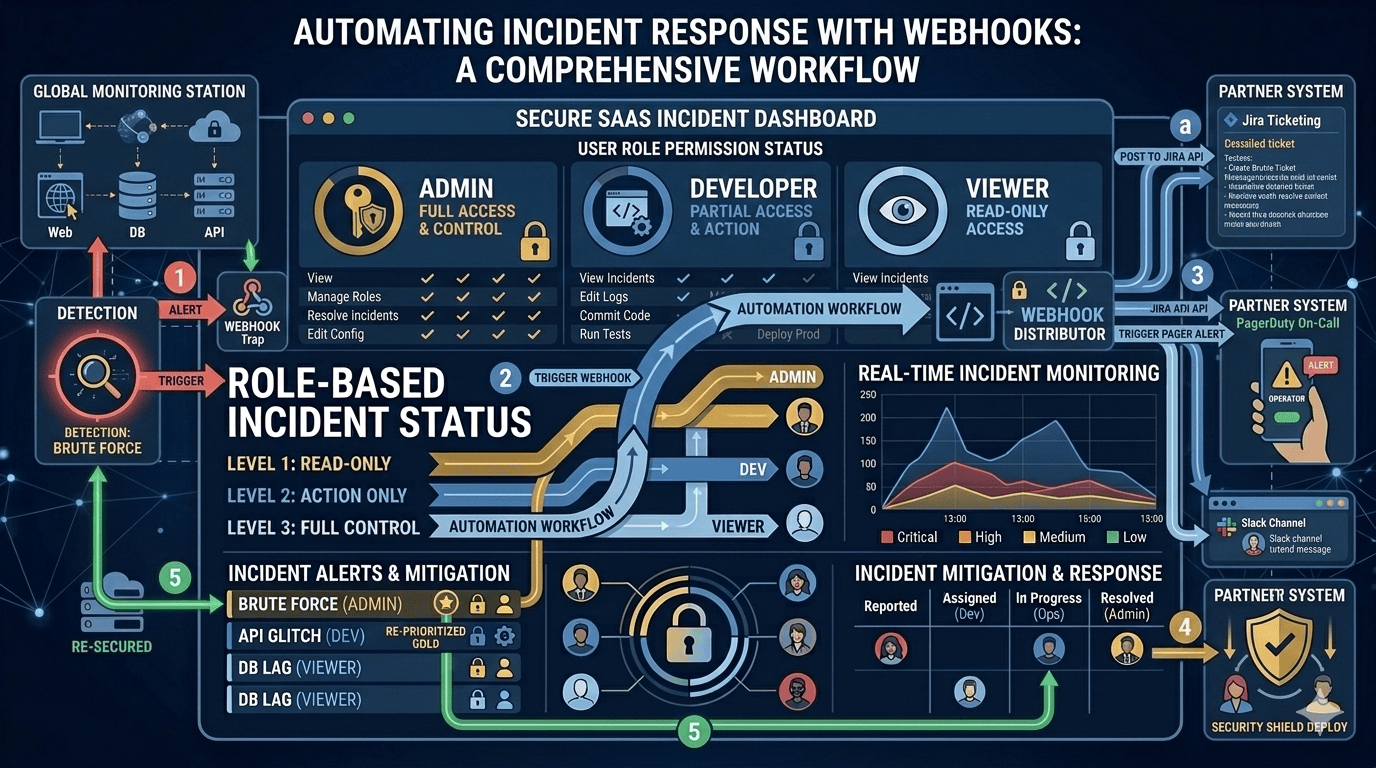

Manual incident response breaks down quickly as systems grow.
At a small scale, it feels manageable. An alert fires. Someone checks it and posts in Slack. Other person opens a ticket. Someone updates stakeholders. That chain works until coordination overhead starts slowing everything down.
Modern engineering teams solve this by moving toward event-driven incident response. Instead of manually passing information between systems and people, events trigger automated actions.
Webhooks are one of the mechanisms commonly used in that transition.
What Webhooks Do in Incident Workflows
A webhook allows one system to send real-time data to another system when a specific event occurs.
In incident management, those events might include:
- Alert triggered
- Incident created
- Severity changed
- Incident acknowledged
- Incident resolved
- Service status updated
Instead of repeatedly polling an API to check for updates, the receiving system is notified instantly through an HTTP request.
This push-based approach reduces latency and ensures that state changes propagate quickly across connected systems.
How Webhook-Driven Automation Works
In a webhook-based architecture, an incident management tool sends a structured payload to a predefined endpoint when an event occurs.
A simplified payload might look like this:
{
“event_type”: “incident.triggered”,
“incident_id”: “INC-4821”,
“title”: “Database latency spike”,
“severity”: “high”,
“service”: “payments-api”,
“triggered_at”: “2026-02-15T14:22:31Z”
}
The receiving service then processes this event and takes action. That action could include:
- Creating or updating a ticket
- Updating a dashboard
- Triggering an internal workflow
- Sending downstream notifications
The important principle is that automation reacts to state changes automatically rather than relying on human coordination.
Security and Reliability Considerations
In production systems, webhook endpoints must be treated as public interfaces.
Teams typically implement:
- HTTPS-only endpoints
- Signature validation using shared secrets
- Timestamp validation to prevent replay attacks
- Idempotent event handling
- Monitoring for delivery failures
Without these safeguards, webhook-based automation can introduce new failure modes.
Observability is equally important. Silent delivery failures can break automation without immediate visibility. Mature systems track delivery success rates and alert on repeated failures.
Webhooks Versus Other Event Mechanisms
Webhooks are not the only way to automate incident workflows.
Message queues and event buses provide additional guarantees, such as:
- Durable event storage
- Ordered processing
- Backpressure handling
Many large systems combine these approaches. Webhooks are often used for cross-system notifications, while queues handle internal event pipelines.
The right choice depends on reliability requirements and architectural complexity.
Automating Incident Response Through Notification Channels
Not all automation requires direct webhook endpoints.
In many SaaS environments, incident response automation focuses on structured notifications rather than system-to-system API integrations.
For example, when an incident changes state, automated notifications can be triggered across:
- Slack channels
- Microsoft Teams workspaces
- SMS alerts for on-call engineers
- Email distribution lists
This approach ensures immediate visibility without requiring custom integration endpoints.
While this model is notification-driven rather than API-driven, it still achieves event-based response. The moment an incident is acknowledged, escalated, or resolved, the right stakeholders are informed automatically.
Communication platforms like Incipulse support this type of structured, multi-channel notification flow. Even without direct webhook integrations, automated alerts across collaboration tools reduce coordination delays and ensure consistent incident visibility.
For many organizations, especially those prioritizing communication reliability, this level of automation delivers significant operational improvement.
Common Failure Patterns in Incident Automation
Whether using webhooks or notification-driven automation, teams often encounter similar challenges.
One common issue is tightly coupling downstream systems to specific event formats. If event structures change without versioning, automation pipelines can break unexpectedly.
Another common issue is blocking workflows. If a receiving system performs heavy processing synchronously, delays can trigger retries and duplicate actions.
Resilient automation requires:
- Fast acknowledgement of events
- Asynchronous processing
- Clear logging
- Version-aware payload handling
Automation should reduce operational risk, not introduce new hidden dependencies.
When Not to Automate
Automation is most effective for predictable, repeatable actions such as:
- Propagating incident state changes
- Notifying stakeholders
- Updating dashboards
It should not replace human judgment in areas such as:
- Root cause analysis
- Severity reassessment
- Customer-facing messaging tone
The objective is to remove friction from coordination while keeping decision-making where it belongs.
Conclusion
Automating incident response improves consistency, reduces coordination delays, and ensures that critical information moves quickly across systems and teams.
Webhooks represent one widely used mechanism for event-driven automation. At the same time, structured notification workflows through collaboration and messaging platforms can achieve similar operational benefits without requiring custom integration endpoints.
For modern engineering teams, the goal is not simply automation for its own sake. It is building incident response processes that remain reliable and synchronized even as systems grow more complex.
FAQs
Do you need webhooks to automate incident response?
Not necessarily. Webhooks are one common way to build event-driven automation between systems. However, automation can also be achieved through structured notification workflows. For many teams, sending real-time alerts to Slack, Teams, SMS, or email is enough to reduce coordination delays without implementing custom webhook endpoints.
What is the difference between webhook automation and notification-based automation?
Webhook automation typically connects systems through API calls, allowing downstream tools to react programmatically to incident events. Notification-based automation focuses on instantly informing people through collaboration and messaging platforms. Both are event-driven, but one integrates systems while the other prioritizes human coordination.
Are webhooks reliable for production incident workflows?
They can be, if implemented correctly. Reliable webhook workflows require HTTPS endpoints, signature validation, idempotent processing, retry handling, and monitoring. Without these safeguards, delivery failures or duplicate processing can create new operational risks.
When should teams use message queues instead of webhooks?
Message queues are better suited for internal event pipelines that require durability, ordering guarantees, and backpressure handling. Webhooks are typically simpler and well suited for cross-system notifications or external integrations.
Can notification automation reduce incident response time?
Yes. Automatically sending updates to Slack, Teams, SMS, or email ensures the right stakeholders are informed immediately when incident states change. Faster awareness often translates into faster coordination and resolution.
