
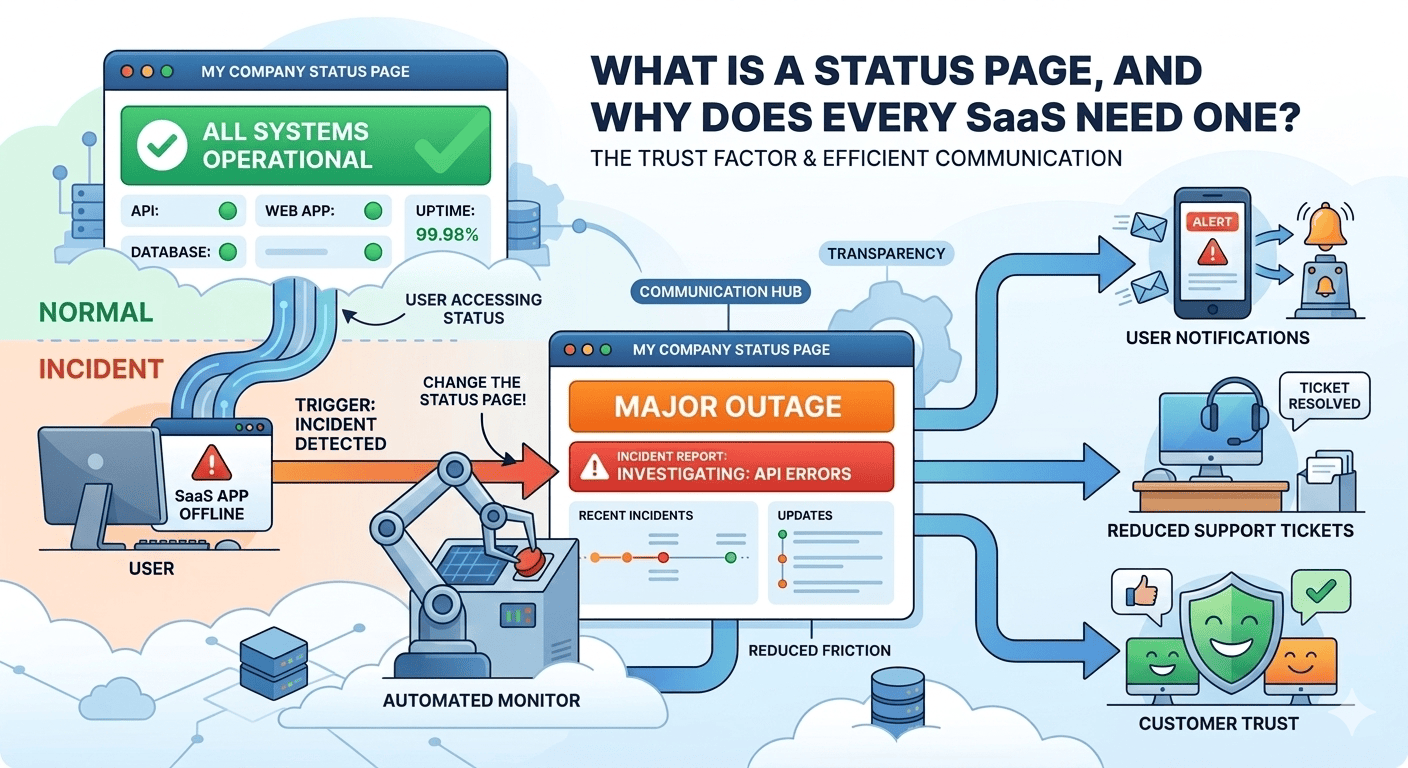

You don’t realize how much users rely on your SaaS until something stops working.
A button doesn’t respond. The dashboard takes too long to load. Login suddenly fails. From your side, it might feel like a small, temporary issue. To the user, it feels like uncertainty: They don’t know if it’s a problem on their end, whether they did something to break it, or if your product is unreliable.
When users don’t get answers quickly, they don’t wait patiently. They open support tickets, refresh the app repeatedly, complain on social media, or quietly lose confidence in your product.
This is where a status page changes everything, not by fixing the issue faster, but by telling users what’s actually going on, in real time, without them having to ask.
What is a Status Page?
A status page is a public-facing page that displays whether your product is experiencing normal or subpar performance. It tells users, at a glance, what’s up and what’s not.
Instead of wondering:
- “Is this just me?”
- “Did my internet break?”
- “Is the app down?”
They get a clear answer.
It typically displays:
- Which parts are operational in your product?
- Whether there is an ongoing problem
- If performance is degraded or fully down
- Updates on what’s being fixed and when
Think of it as a live notice board for your product’s health. You don’t use it every day, but when something goes wrong, it becomes the most important page you own.
Why Status Pages Matter More Than You Think?
Most users don’t expect zero downtime. What they expect is honesty.
According to a Salesforce “State of the Connected Customer” report, 88% of customers say trust is as important as the product itself. During outages or disruptions, trust is built or lost based entirely on how you communicate.
A status page helps you to:
- Acknowledge problems early
- Set clear expectations
- Control the narrative rather than reacting to speculation.
- Reduce panic-driven support tickets
- Maintain credibility even in the face of setbacks
Why Not Having a Status Page Makes Small Issues Feel Big
Let’s say your API has intermittent latency for 20 minutes. That’s doable, technically.
But without the status page, here’s what happens:
- Users make requests several times.
- They assume that something is misconfigured
- Support tickets start coming in
- Frustration builds because there’s no confirmation
Now, imagine that same scenario with a status page.
Users check it, notice the issue is acknowledged, and understand it’s being handled.
Nothing about the incident changed-only communication did. And that in itself reduces panic, pressure, and churn.
Now consider that same scenario with a status page.
A user checks it and finds:
Payment Processing: Delays are currently being experienced. Investigation updates will follow.
Everything just changed with that one sentence. The user knows the problem is real, acknowledged, and being processed. They stop retrying blindly. They stop blaming themselves, and wait.
The incident didn’t change; the perception did.
Why Status Pages are Especially Crucial for SaaS Products
As a SaaS business, you’re not selling a one-time download; you’re selling reliability over time.
Your users rely on your product to get work done, see customers, and meet deadlines. When your service is unavailable, it impacts more than their screen.
A status page helps because:
- Your product is expected to be available 24/7.
- Downtime is immediately visible.
- Silence feels like neglect.
- Transparency generates long-term trust.
Even mature SaaS companies, whose engineering teams are strong, use status pages because incidents are inevitable. What the users remember is how clearly and how fast you communicated.
Critical Difference: Public vs Private Status Pages
There is a critical distinction in identifying just who the status page is for that many SaaS teams overlook.
Public vs Private Status Pages
| Aspect | Public Status Page | Private Status Page |
| Audience | Customers, prospects, partners | Internal teams only |
| Access | Open to everyone | Restricted (employees, ops teams) |
| Purpose | Transparency and customer communication | Operational tracking |
| SEO visibility | Yes | No |
| Trust-building | High | Not applicable |
| Example use case | Customer-facing SaaS products | Internal tools or staging systems |
Why This Matters
If your SaaS has paying users, you need a public status page. A private one might help internally, but it doesn’t solve user confusion. Users can’t log in to see what’s broken-that’s exactly when they need the page.
Types of Status Pages and When Each One Works Best
Not all status pages serve the same purpose, and the right type depends on your product maturity and audience.
| Type of Status Page | Best Used When | Why It Works |
| Basic uptime status | Early-stage SaaS | Simple, low maintenance, sets expectations |
| Component-based status | Growing SaaS | Shows which features are affected |
| Incident-focused status | Developer tools, APIs | Helps users debug faster |
| Maintenance-first status | Enterprise SaaS | Prevents surprise downtime |
| Advanced status with history | Mature SaaS | Builds long-term credibility |
If you’re just getting started, even a basic status page is better than nothing. As your product grows, breaking down services into components becomes vital so users know exactly what’s impacted. To discuss more about status pages, connect with Incipulse.
Why Do Users Check the Status Page Before Contacting Support?
This is an important, yet often underestimated point.
When something goes wrong for users, the instinct isn’t to complain-people want to understand. A visible status page that is well-maintained becomes the first stop.
This directly affects support volume.
According to Zendesk customer experience data, nearly 67% of customers prefer self-service over contacting support. One of the simplest, most effective self-service tools you can offer during incidents is a status page.
By answering “Is it down?” publicly, you prevent hundreds of identical tickets and free your support team to handle real edge cases.
How Status Pages Can Help You Control the Narrative
If you don’t explain what’s happening, users will explain it for you—oftentimes, inaccurately.
Without a status page:
- Users speculate on social media.
- Rumors spread.
- Minor issues seem catastrophic.
- Brand perception is negatively affected.
With a status page:
- You acknowledge the problem first.
- You define the scope clearly.
- You update regularly.
- You show accountability.
This moves you from being reactive to proactive. When the news isn’t good, users want to hear it from you anyway.
Example: How a Status Page Helped in an Outage
A few years ago, there was an outage in one of the very popular developer platforms, where, for a short period of time, no one could push code and access repositories. The issue was serious, but what stood out was how that company handled communication.
Rather than allowing speculation to spread, they:
- Acknowledged the issue in a matter of minutes.
- Updated their status page regularly.
- Explained what was affected and what wasn’t.
- Shared a resolution update once services stabilized.
As a result, developers didn’t flood support channels or assume data loss. Many users said afterwards that, as frustrating as the outage had been, the transparency reassured them that the situation was under control.
The takeaway is simple:
- You don’t need perfect uptime. You need visible accountability.
- Status pages aren’t just for downtime
Many SaaS teams think status pages are only useful when it all breaks. That’s a mistake.
Other uses of it should include:
- Planned maintenance
- Feature rollouts that might impact performance
- Partial outages where only some users are affected
- Post-incident summaries
With time, users learn to trust your communication when they see updates consistently, even during scheduled maintenance. The status page becomes an extension of your product’s credibility.
What Makes a Status Page Actually Useful?
A good status page does not overwhelm its users. It keeps things simple and clear.
At a minimum, it should include:
- A list of core product components
- Clear status indicators: operational, degraded, outage
- Plain-language incident updates
- Timestamps for every update
- A visible history of past incidents
Avoid technical jargon and internal terminology. They don’t need to know how you’re fixing the issue. It’s only important for them to know that you are in action.
Common Beginner Mistakes to Avoid
If you’re setting this up for the first time, stay away from these traps:
- Waiting too long to publish the first update
- Posting once and going silent
- Sending vague messages without any progress updates.
- Treating the status page as an afterthought
A status page is only useful if users trust that it will be updated regularly, and Incipulse can help you with it.
Conclusion: Status Page Is About Trust, Not Just Uptime
Every SaaS product is going to encounter problems. What sets apart the truly reliable products from the forgettable ones isn’t whether problems happen-it’s how openly they’re dealt with.
A status page gives you control of the message when things go wrong. It reduces support pressure, soothes users, and shows that you take responsibility seriously.
If your product matters to users, the communication should reflect that. A status page is one of the most straightforward ways to prove it.
Frequently Asked Questions
Does every small SaaS product require a status page?
Yes. Even early-stage SaaS products benefit from including a status page. It prevents confusion, reduces support queries, and builds trust from day one, especially since users will depend on your product for critical tasks.
Should the status page be public or behind login?
A status page should always be public. When users can’t log in, they often need answers, so restricting access defeats its purpose and increases frustration.
How frequently during an incident should a status page be updated?
Updates should be given frequently so progress is shown, even if there’s no resolution yet. Through regular communication, the users are reassured that their issue has not been forgotten.
