
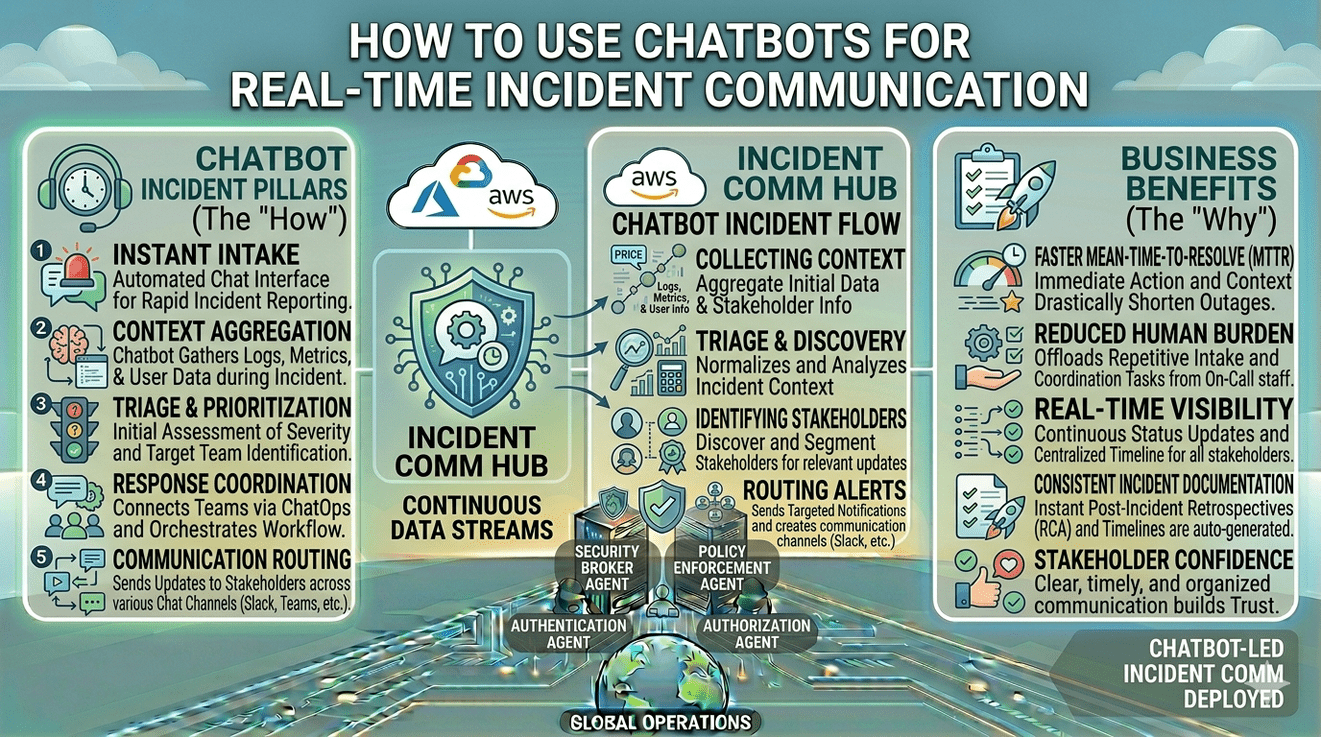

During a major incident, communication delays create almost as many problems as the outage itself.
Teams scramble to answer repetitive questions. Support channels become overloaded. Internal stakeholders wait for updates that arrive inconsistently. Customers refresh dashboards, Slack channels, and inboxes looking for clarity.
This is why many organizations are integrating chatbots into their incident communication workflows.
Modern chatbots are no longer limited to basic customer support automation. In incident management environments, they act as real-time communication layers that distribute alerts, answer common questions, escalate information, and keep both technical teams and users informed during disruptions.
When implemented correctly, chatbots reduce communication friction, improve response coordination, and accelerate incident visibility across the organization.
Why Real-Time Incident Communication Matters
Incidents evolve quickly. A delay of even a few minutes in acknowledging or communicating an issue can create confusion internally and externally.
Without structured communication:
- Support tickets increase rapidly
- Teams duplicate investigation efforts
- Customers assume the worst
- Internal stakeholders lose visibility
- Escalation becomes chaotic
Real-time communication reduces uncertainty. It ensures that everyone receives consistent updates instead of relying on fragmented conversations across channels.
This is where chatbots become operationally valuable.
What Incident Communication Chatbots Actually Do
In incident management, chatbots function as automated communication agents connected to monitoring systems, collaboration tools, and status workflows.
Their role is not to resolve infrastructure problems directly. Their role is to move reliable information quickly.
For example, a chatbot may:
- Send outage alerts to Slack or Microsoft Teams
- Notify stakeholders when severity changes
- Provide users with live status updates
- Collect incident reports from employees or customers
- Route critical issues to the correct teams
- Share links to status pages or runbooks
- Confirm when incidents are resolved
This creates a communication layer that operates continuously without depending on manual coordination.
Why ChatOps Changed Incident Management
The rise of ChatOps significantly changed how engineering teams handle incidents.
Instead of switching constantly between dashboards, email threads, ticketing systems, and communication tools, teams now coordinate directly inside collaboration platforms such as Slack or Microsoft Teams.
Chatbots play an important role in this model because they centralize operational visibility inside the communication channel itself.
For example:
- A monitoring alert triggers automatically in Slack
- The chatbot posts severity details
- Responders acknowledge the issue
- Status updates are distributed automatically
- Stakeholders receive progress updates in real time
This reduces communication latency and keeps incident coordination visible to the relevant teams.
How Chatbots Improve Incident Response Speed
One of the biggest operational advantages of chatbots is response acceleration.
During incidents, manual communication creates bottlenecks. Someone must draft updates, notify teams, answer repeated questions, and maintain consistency across channels.
A chatbot reduces that burden by automating repetitive communication tasks.
For example:
- The moment monitoring detects an outage, the chatbot can send alerts instantly.
- If a user asks whether a service is affected, the chatbot can pull live status information automatically.
- If severity escalates, the chatbot can notify leadership channels immediately.
This automation allows engineers to focus on diagnosis and remediation instead of coordination overhead.
Using Chatbots Across Slack, Teams, and Web Portals
Different communication environments serve different audiences.
Slack and Microsoft Teams
Internal incident communication often happens inside collaboration tools. Chatbots integrated into Slack or Teams help:
- Notify responders immediately
- Trigger escalation workflows
- Maintain incident timelines
- Keep leadership informed
- Reduce fragmented conversations
This supports faster coordination during high-pressure situations.
Customer-Facing Web Portals
Externally, chatbots can help users verify incidents without opening support tickets.
For example, a customer may ask:
- “Is the platform down?”
- “Which regions are affected?”
- “When is the expected resolution?”
The chatbot can respond using live incident or status page data.
This improves transparency while reducing repetitive support load.
Best Practices for Using Chatbots in Incident Communication
Keep Responses Clear and Operational
During incidents, users want clarity, not overly technical explanations.
Good chatbot responses should explain:
- What is affected
- Whether the issue is acknowledged
- Where users can track updates
- When the next update is expected
Simple, structured communication reduces anxiety.
Avoid Fully Replacing Human Communication
Chatbots should support communication, not replace human judgment entirely.
Complex customer concerns, executive communication, and sensitive security incidents often require human oversight. Automation works best when handling repetitive updates and routing workflows, while humans manage context-sensitive decisions.
Integrate Chatbots with Reliable Status Systems
A chatbot is only as reliable as the data it receives.
If incident updates are inconsistent internally, the chatbot may distribute outdated or conflicting information. Integration with centralized status systems ensures communication remains accurate across channels.
Platforms such as Incipulse help teams centralize status updates and notifications across Slack, Teams, email, SMS, and status pages. When communication sources remain synchronized, chatbot-driven updates become significantly more reliable.
Define Escalation Rules Carefully
Not every alert deserves the same level of escalation.
Chatbots should distinguish between:
- Informational updates
- Minor incidents
- Critical outages
- Security-related events
Poorly configured escalation logic creates alert fatigue and reduces trust in automation systems.
Security Considerations for Incident Chatbots
Incident communication often involves sensitive operational information.
Chatbots handling outage or breach communication should:
- Restrict access to internal incident channels
- Authenticate sensitive requests
- Avoid exposing confidential infrastructure details
- Maintain audit logs for incident communication actions
In security-related incidents especially, communication visibility must be controlled carefully.
Transparency matters, but uncontrolled disclosure creates additional risk.
Common Mistakes Companies Make
One common mistake is over-automating communication.
Some organizations configure chatbots to post every monitoring alert automatically. This creates noise rather than clarity. Teams quickly begin ignoring notifications.
Another mistake is using inconsistent communication sources. If status pages, chatbot responses, and support updates differ, users lose trust in all channels simultaneously.
The goal is not maximum automation. The goal is consistent, trustworthy communication.
How Chatbots Reduce User Frustration During Incidents
Users become frustrated primarily when they feel uninformed.
A chatbot cannot eliminate downtime, but it can eliminate uncertainty around downtime. Immediate acknowledgement, structured updates, and accessible information reduce the anxiety that often accompanies service disruptions.
Even simple interactions such as:
- Confirming an incident is known
- Sharing estimated update timelines
- Directing users to status pages
can significantly improve customer experience during outages.
The Future of Chatbots in Incident Management
As AI-powered systems become more advanced, incident communication chatbots will likely evolve beyond basic notifications.
Future systems may:
- Summarize incidents automatically
- Detect communication gaps
- Personalize updates by customer segment
- Predict escalation risk
- Recommend remediation workflows
However, the core principle will remain the same: faster, clearer, and more structured communication during operational disruption.
Conclusion
Chatbots are becoming an important part of modern incident communication strategies because they reduce coordination delays and improve real-time visibility during disruptions.
By integrating with Slack, Teams, web portals, and centralized status systems, chatbots help organizations automate repetitive communication tasks while keeping both technical teams and users informed consistently.
The value of chatbots in incident management is not just automation. It is the ability to maintain clarity when operational pressure is highest.
FAQs
How do chatbots help during incidents?
Chatbots automate real-time communication by sending alerts, sharing status updates, routing escalations, and answering common questions during outages or security incidents.
Can chatbots replace human incident communication teams?
No. Chatbots are best used for repetitive updates and coordination support. Sensitive communication and strategic decisions still require human oversight.
Which platforms are commonly used for incident communication chatbots?
Slack, Microsoft Teams, status pages, and customer web portals are among the most common environments for chatbot-driven incident communication.
What are the biggest risks of chatbot-based incident communication?
Poorly configured automation, inconsistent data sources, and excessive alerting can reduce trust and create communication noise during incidents.
